
An inquiry is the first stage of a family's journey with your school, captured when they submit an inquiry form, sign up for an event, or call in to ask questions. Finalsite Enrollment creates a record with the status of Inquiry, links the parent record, and gives you internal tools (list pages, an internal-only checklist, automated communications) to nurture the relationship through to application.
💡Quick Answers
- How do families become inquiries in Finalsite Enrollment? By submitting an inquiry form, signing up for a calendar event hosted by your school, being entered manually by an admin via the Quick Action menu, or being imported.
- Do inquiring families have a Parent Portal account or checklist? No. Parent Portal accounts and parent-facing checklists do not exist until the application stage. At the inquiry stage, only your internal team can see the Inquiry Checklist.
- What automated communications do inquiring families receive? Built-in thank-you pages (customizable via Parent Portal Content) and thank-you emails. PRO accounts can layer on custom Automated Communication Plans.
- Where do I track inquiries in bulk? Admissions > Students in Admissions > Inquiry tab. This list page shows checklist progress at a glance, supports filtering, and offers bulk actions like sending emails or downloading forms.
- What happens when an inquiry submits an application? Their status updates automatically to Applicant, and they gain access to a parent-facing admissions checklist in the Parent Portal.
- How do I add an inquiry from a phone call? Use the + Quick Action menu in the top right and select Inquiry Form. See Inquiry Form: Admin Entered. Note: admin-entered inquiries do not trigger the thank-you landing page or automated inquiry email.
In this article
- First Connection
- Inquiry Students in Finalsite Enrollment
- Communication with Inquiring Families
- Ways to stay connected with families
- Tracking the progress of an Inquiry
- Beyond the Inquiry Stage
- Library of Resources
First Connection
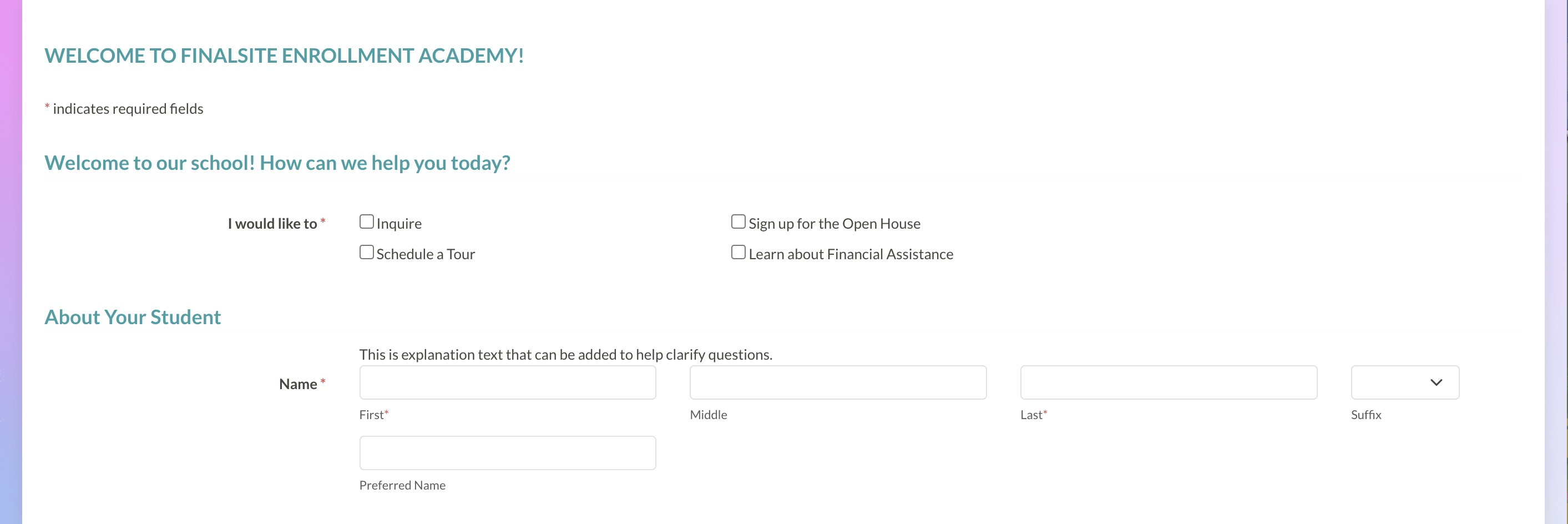
Using Finalsite Enrollment, families can connect with your school to request more info or express interest through a variety of channels. When they do, their information is stored in the system, allowing you to communicate with them and track their progress.
Some of the ways interested families can initially be added to Finalsite Enrollment include completing an Inquiry form, signing up for an event hosted by your school, and calling in to ask questions.
Resources
- Read about creating a strong Inquiry page on your school's website here: Anatomy of a Perfect Admissions Inquiry School Landing Page
- Read more detailed information about the journey of a family after they inquire about your school: Inquiry Collection & Communication
- Learn about how to enter a student/parent into your site as an Inquiry if they call into your school: Inquiry Form: Admin Entered
- Read about how to embed an Inquiry form into your school website here: Embed Inquiry Form into Websites
- Do you have Niche profile? Learn about how to capture inquiries through the Niche integration: Niche Integration
Inquiry Students in Finalsite Enrollment
When a family connects with your school, records are created for them in Finalsite Enrollment, and students are given the status of Inquiry to signify their place in the journey.
Inquiry students are connected with their parents, who also have records created for them in the system.

Resource
Read more about the Finalsite Enrollment Inquiry statuses here: Roles & Statuses Explained.
Communication with Inquiring Families
Finalsite Enrollment has built-in thank you pages and emails that are sent to families who inquire by submitting an inquiry form or signing up for an event. Branding and customizing the landing page and emails is important so that you give families a warm welcome to your community.
Ways to stay connected with families
- Use the built-in list pages to view all your inquiring students and send bulk emails directly from that page.
- Schools with PRO accounts can access extra tools to create customized automated communications for families.
Resources
- Read about the thank you page that families see after submitting an online Inquiry form here: Parent Portal Content.
- Read more about the system's automated communications for Inquiries that are built into Finalsite Enrollment here: Parent Communications
- Read more about setting up custom Automated Communications for your inquiring families: Inquiry & Admissions Automated Communication Plans (ACPs)
Tracking the progress of an Inquiry
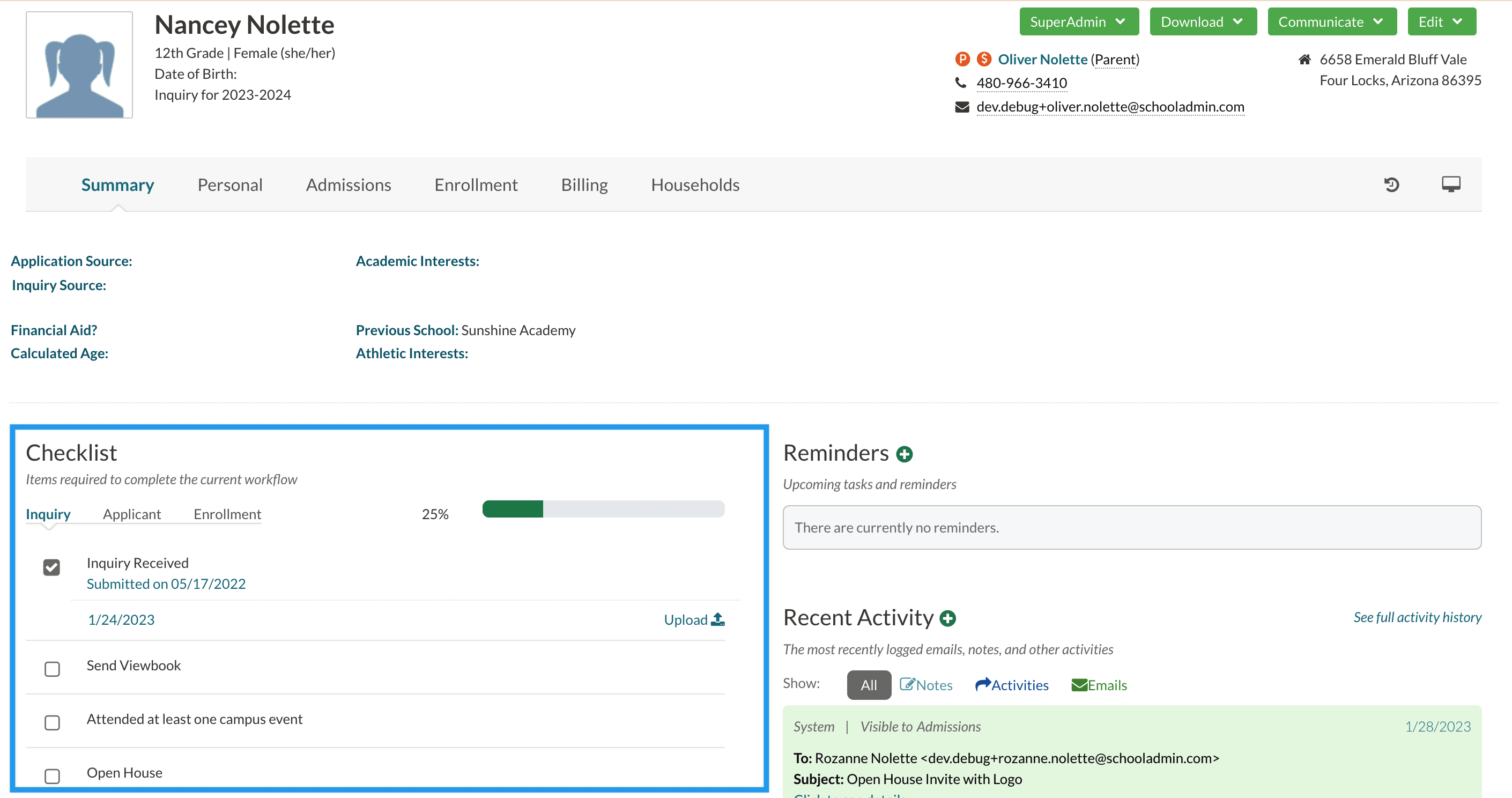
Families at this stage do not log into the parent portal or see a checklist on their end. You, however, have access to an internal inquiry checklist (which the families do not see.)
This internal-only checklist is a way for you to track the student's progress in the journey toward enrollment and can be a helpful tool in communicating with your team about the progress.
Bulk Tracking
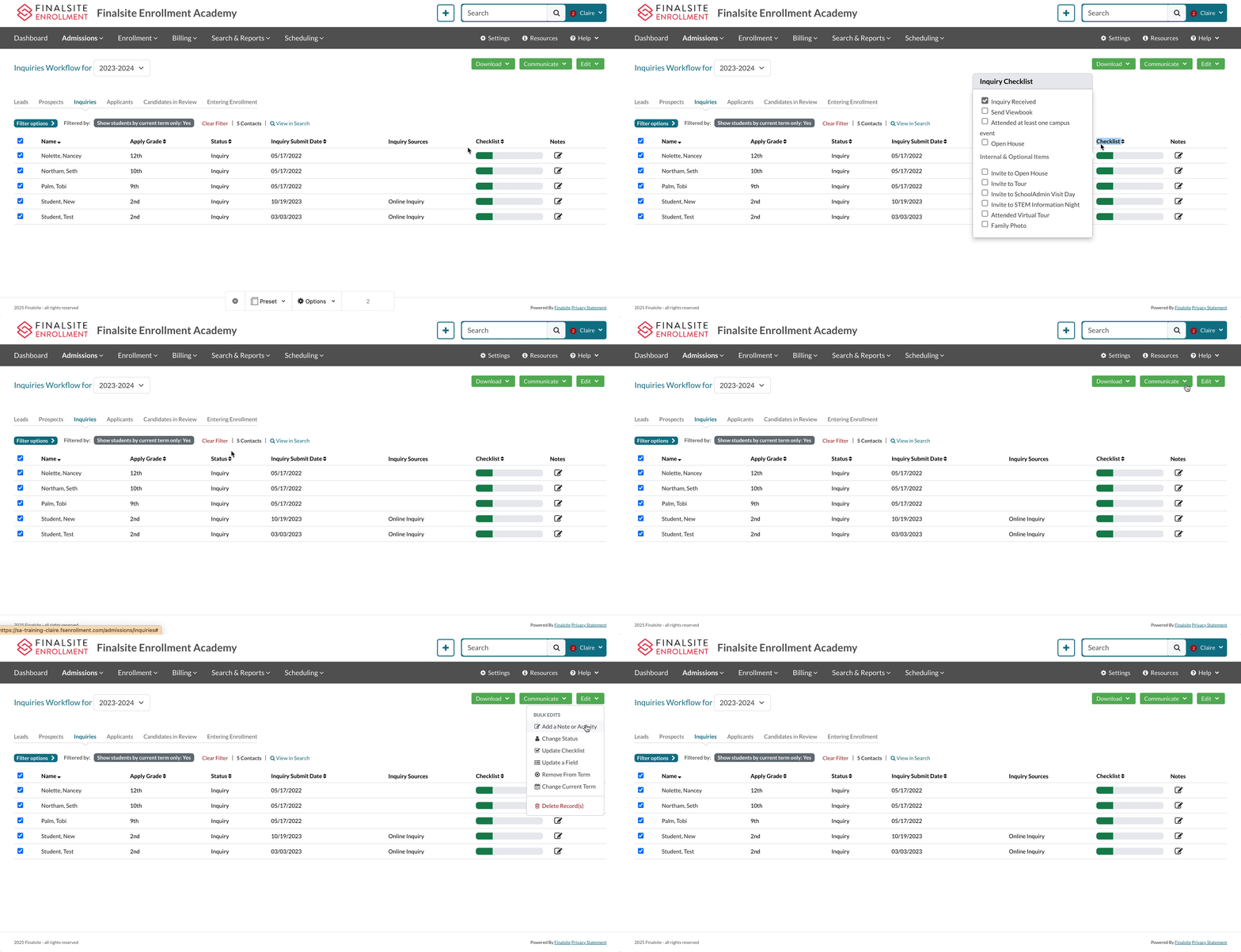
You can utilize the Inquiry list page (Admissions > Students in Admissions > Inquiry Tab) to see all of your Inquiries listed in one place. From this page, you can:
- See their checklist progress at a glance.
- Filter the page to show students based on criteria.
- Utilize bulk actions in the dropdown menus like downloading forms or sending emails (after selecting one or more students).
Resources
- Read more about how to build an efficient internal Inquiry checklist: Inquiry Checklist
- Read about managing Inquiries in bulk within this page: The Admissions List Page Overview
Beyond the Inquiry Stage
After the student submits an application to your school, their status automatically gets updated by the system to Applicant. As an applicant, the parent will have access to a parent-facing admissions checklist in the parent portal where they can complete the required next steps to becoming enrolled in your school.
Library of Resources
- Read more detailed information about the journey of a family after they inquire about your school: Inquiry Collection & Communication
- Learn about how to enter a student/parent into your site as an Inquiry if they call into your school: Inquiry Form: Admin Entered
- Read about the thank you page that families see after submitting an online Inquiry form here: Parent Portal Content
- Read more about the system automated communications for Inquiries that are built into Finalsite Enrollment here: Parent Communications
- Read more about the Finalsite Enrollment Inquiry statuses here: Roles & Statuses Explained.
- Read more about setting up custom Automated Communications for your inquiring families: Inquiry & Admissions Automated Communication Plans (ACPs)
- Read about creating a strong Inquiry page on your school's website here: Anatomy of a Perfect Admissions Inquiry School Landing Page
- Read more about how to build an efficient internal Inquiry checklist: Inquiry Checklist
Comments
0 comments
Article is closed for comments.